When it comes to calculating percent change in Excel, it can be a bit tricky if you're not familiar with the formulas and functions. However, with a little practice, you'll be a pro in no time. In this post, we'll go over the basics of percent change calculation in Excel, as well as some tips and tricks to help you get the most out of your data.
1. Understanding the Formula
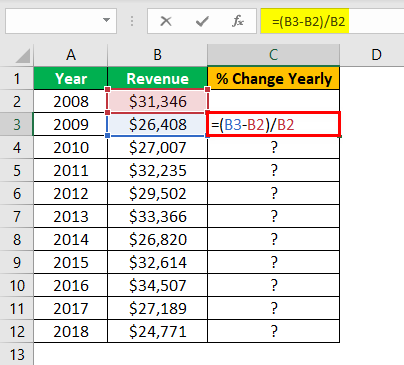
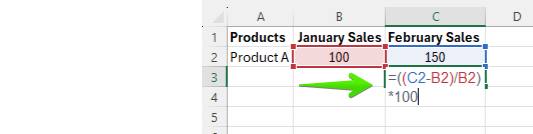
The formula for calculating percent change in Excel is ((new value - old value) / old value) * 100. This formula is used to calculate the percentage increase or decrease between two values. For example, if you want to calculate the percent change in sales from one quarter to the next, you would use this formula to compare the two values.
2. Using the Percent Change Formula in a Cell
To use the percent change formula in a cell, simply type the formula into the cell where you want to display the result. For example, if you have the old value in cell A1 and the new value in cell B1, you would type the formula =((B1-A1)/A1)*100 into the cell where you want to display the result. Press enter, and the formula will calculate the percent change.
3. Calculating Percent Change for Multiple Cells
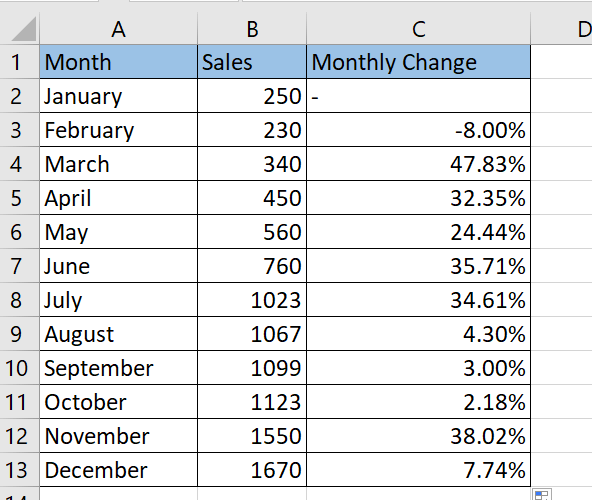
If you need to calculate the percent change for multiple cells, you can use the same formula, but you'll need to adjust the cell references to match the cells you're working with. For example, if you have a range of old values in column A and a range of new values in column B, you can use the formula =((B2-A2)/A2)*100, and then copy the formula down to the other cells in the column.
4. Using the AutoFill Feature
One of the easiest ways to calculate percent change for multiple cells is to use the AutoFill feature. To do this, select the cell that contains the formula, and then click and drag the fill handle (the small square at the bottom right corner of the cell) down to the other cells in the column. This will automatically fill the formula down to the other cells.
5. Handling Errors and Zero Values
When working with percent change formulas, you may encounter errors or zero values. For example, if the old value is zero, the formula will return a #DIV/0 error. To avoid this, you can use an IF statement to check if the old value is zero before calculating the percent change. For example, you can use the formula =IF(A1=0,"",((B1-A1)/A1)*100).
6. Formatting Percent Change Values
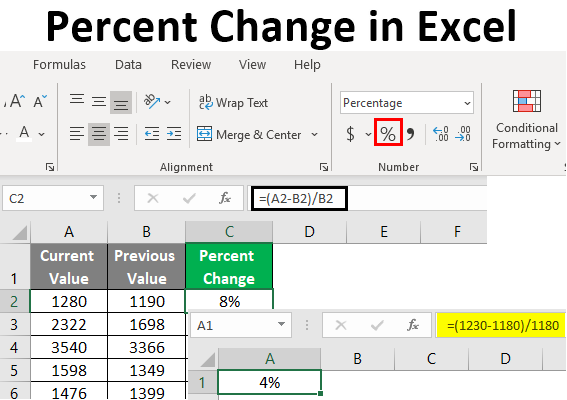
Once you've calculated the percent change, you may want to format the values to display as percentages. To do this, select the cells that contain the percent change values, and then click on the Home tab in the Excel ribbon. Click on the Number group, and then select Percentage from the drop-down menu. This will format the values to display as percentages.
7. Creating a Percent Change Column
If you need to calculate the percent change for a large range of data, you can create a new column to display the percent change values. To do this, select the entire range of data, and then click on the Insert tab in the Excel ribbon. Click on the Columns button, and then select a new column to the right of the data range. Use the percent change formula to calculate the values for the new column.
8. Using Named Ranges
Named ranges can make it easier to work with percent change formulas, especially if you need to reference the same ranges of data multiple times. To create a named range, select the range of data, and then click on the Formulas tab in the Excel ribbon. Click on the Define Name button, and then enter a name for the range. You can then use the named range in your percent change formulas.
9. Calculating Cumulative Percent Change
Cumulative percent change is the total percent change over a series of periods. To calculate cumulative percent change, you can use the formula =((new value / old value) - 1) * 100, and then add up the cumulative percent changes for each period. This can help you to see the overall trend in the data over time.
10. Troubleshooting Common Issues
Finally, if you encounter any issues when calculating percent change in Excel, there are a few things you can check. Make sure that the old and new values are in the correct cells, and that the formula is referencing the correct cells. Also, check for any errors or zero values, and use an IF statement to handle these cases. With a little practice, you should be able to calculate percent change like a pro.
If you are searching about Percent Change Formula in Excel (Easy Steps) you've came to the right page. We have 10 Pictures about Percent Change Formula in Excel (Easy Steps) like Percent Change Formula in Excel (Easy Steps), Percent Change Formula in Excel (Easy Steps) and also How to Calculate Percent Change in Excel - Sheetaki. Here it is:
Percent Change Formula In Excel (Easy Steps)
 www.excel-easy.com
Percent Change Formula in Excel (Easy Steps)
Excel Percent Change Formula: Calculate Percentage Increase, 42% OFF
 www.oceanproperty.co.th
Excel Percent Change Formula: Calculate Percentage Increase, 42% OFF
How To Calculate Percentage Change In Excel
 www.simplesheets.co
How To Calculate Percentage Change in Excel
Percent Change In Excel | How To Calculate Percent Change In Excel?
 www.educba.com
Percent Change in Excel | How to Calculate Percent Change in Excel?
How To Calculate Percent Change In Excel - Sheetaki
 sheetaki.com
How to Calculate Percent Change in Excel - Sheetaki
How To Calculate Percentage Change In Excel
 www.simplesheets.co
How To Calculate Percentage Change in Excel
How To Calculate Percent Change In Excel - Sheetaki
 sheetaki.com
How to Calculate Percent Change in Excel - Sheetaki
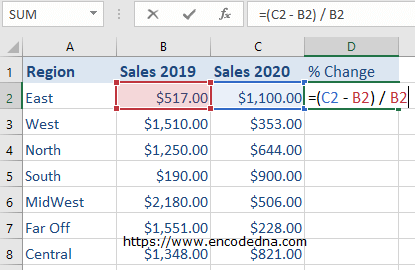
Formula To Calculate Percentage Change In Excel
 www.encodedna.com
Formula to Calculate Percentage Change in Excel
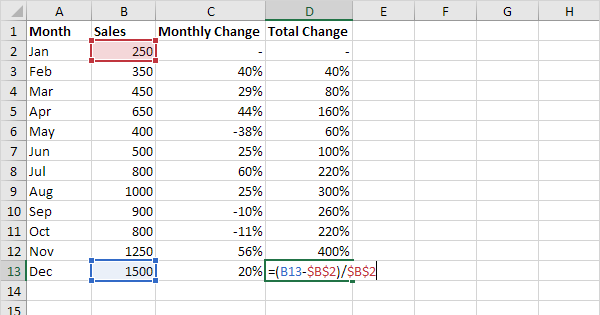
Percent Change Formula In Excel (Easy Steps)
 www.excel-easy.com
Percent Change Formula in Excel (Easy Steps)
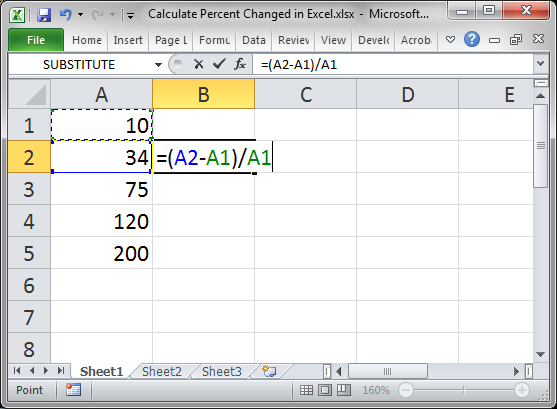
Calculate Percent Change In Excel - TeachExcel.com
 www.teachexcel.com
Calculate Percent Change in Excel - TeachExcel.com
percent change in excel. Formula to calculate percentage change in excel. How to calculate percentage change in excel

